Why This Project Exists
Every other project on this site is something I built. This is the one I run. It has users who are not me — a housemate who wants to watch something without being told about DNS — which turns out to be the entire difference. A service being down is not a ticket, it is someone asking me why it is broken.
That changed how I work on it. There is an incident log with real postmortems, a runbook table mapping symptoms to the document that explains them, and a backup job whose success is displayed on a dashboard rather than buried in a log nobody reads. None of that is necessary for a hobby setup. All of it is necessary if you want to find out whether you can actually operate something.
The Two Hosts
A Dell OptiPlex 3060 Micro does the work: an i5-8500T with an integrated GPU for hardware video transcoding, running AlmaLinux 10 with everything containerised. AlmaLinux is a deliberate choice rather than a default — it is RHEL-compatible, so the conventions I use here are the same ones I use on RHEL, and time spent on either carries directly over to the other.
A Raspberry Pi 4 runs the operationally critical services: DNS and filtering, the dashboard, and the metrics hub. It has them because it is the host on battery backup — when mains power drops, name resolution and monitoring are exactly the things you cannot afford to lose, since without DNS nothing on the network resolves and without metrics you cannot see what state anything is in. The Pi also draws little enough to ride out an outage that would flatten the OptiPlex in minutes.
The network sits behind CGNAT, so there is no inbound connectivity from the internet at all. Remote access goes over a Tailscale tailnet, and nothing is ever exposed publicly. It also has consequences that show up later, in a way I did not anticipate.
Storage: The Disk Dictates The Layout
There is a 119 GB SSD and a 932 GB 2.5-inch HDD. The HDD is drive-managed SMR — shingled media, where overlapping tracks mean a random write can force a read-modify-write of neighbouring data. Under sustained random writes it does not slow down gracefully; it stalls for seconds at a time.
So placement is decided by write pattern, not by size. Anything write-heavy or latency-sensitive lives on the SSD: the Postgres database behind the photo library, generated thumbnails, every service's configuration, the transcode cache, the container image store. The HDD gets only large sequential data — photo and video originals, the media library. Getting this backwards would produce a system that looks fine on paper and feels broken.
The bulk disk is mounted by UUID with
nofail,x-systemd.device-timeout=30, because device names are not stable — that
disk has come up as both sda and sdb across reboots. Anything that
writes to it also carries RequiresMountsFor=, so a service cannot start before
the disk is mounted and quietly write into the root filesystem instead. That failure is
particularly nasty: nothing errors, and you find out when the root filesystem fills up.
Everything Is A systemd Unit
All 19 containers run rootless under an unprivileged user, defined as
podman Quadlets — declarative .container files that systemd
turns into real units. There is no docker-compose up and no daemon running as
root. Linger is enabled for the service user, so everything starts at boot with nobody logged
in, and every service gets systemd's restart behaviour, ordering, and journal for free.
Problem: a tag is a moving pointer. Pulling
:latest — or even :1.2 — can silently change what runs, which
means a restart is a potential upgrade you did not choose and cannot reproduce.
Implementation: every image is pinned by
@sha256: digest, so a pull can never change the running software. Upgrading
is a deliberate act: pull the new tag, read its digest, edit the unit file. It is more
friction, and that is the point — the friction is where you decide to upgrade.
Problem: the usual advice for container volume
problems is to add :Z to the bind mount and move on, or to disable SELinux
entirely. On a 900 GB volume, :Z is not a small decision — it relabels
everything it is given.
Implementation: SELinux stays
Enforcing. The bulk volume is labelled container_file_t
once, so bind mounts of it take no :Z flag — relabelling
~900 GB on every container start would be brutal. Paths under the home directory are
user_home_t and do need :Z. Two rules, each with a
reason, instead of one blanket flag.
Problem: containers that let you choose a UID will write files owned by whatever you pick, and mixing those across services produces a permissions mess that only shows up later.
Implementation: under rootless podman the
container's root maps to the unprivileged host user, so running those containers as UID 0
makes files land owned consistently by that user and confers no host privilege —
the thing that looks alarming is actually the safe option here. Containers that insist on
running as a fixed non-root user instead need an explicit
UserNS=keep-id mapping to land in the same place.
Split-Horizon DNS: Two Audiences, One Set Of Names
Every service answers on a .home name — jellyfin.home,
photos.home, dash.home. The problem is that two different audiences
need two different answers for the same name. A housemate on the LAN with no VPN needs the
LAN address. My own devices, which may be anywhere, need the tailnet address.
So two resolvers answer the same question differently, and both point at the same reverse proxy, which listens on every interface:
flowchart TD
    H["Housemate on the LAN, no VPN"] --> AG["AdGuard Home on the Pi"]
    M["My devices, on the tailnet, anywhere"] --> TS["Tailscale split-DNS rule for .home"]
    TS --> CD["CoreDNS, tailnet-only"]
    AG -->|"resolves to the LAN address"| CADDY["Caddy, listening on all interfaces"]
    CD -->|"resolves to the tailnet address"| CADDY
    CADDY --> SVC["19 services on .home names"]
The tailnet half is reached through a Tailscale split-DNS rule scoped to
.home only, so everything else on those devices keeps using its normal DNS
rather than being routed through my house. The services run plain HTTP on purpose: these are
internal names that no public certificate authority can issue for, so HTTPS would mean either
a private CA on every guest device or a browser warning on every visit. Unmatched hostnames
get a clean 404 rather than whichever service happened to be first.
DNS is deliberately not reachable from the LAN — the tailnet-only resolver must stay tailnet-only, or LAN clients would start getting tailnet addresses they cannot reach. The reverse proxy's admin API is bound to the tailnet address for the same reason. The Tailscale interface sits in the firewall's trusted zone; the LAN does not.
Backups: Verified, Not Assumed
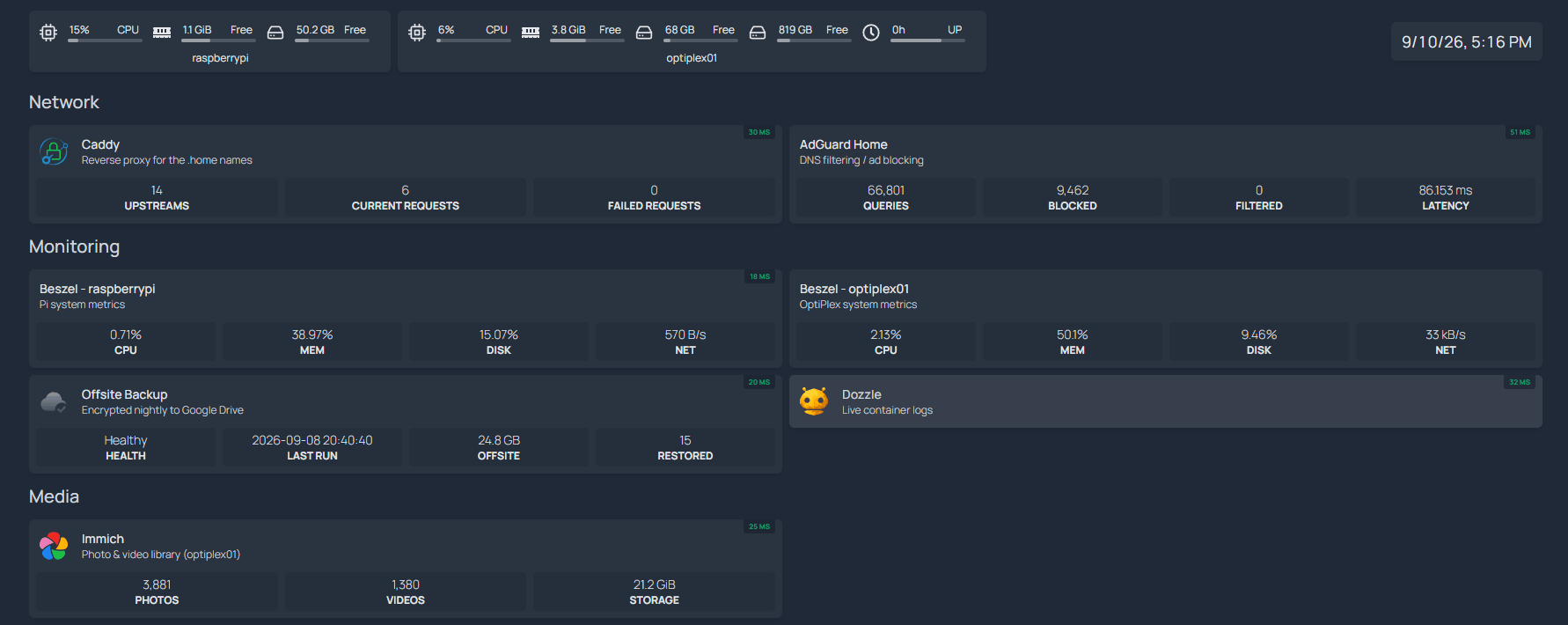
A nightly job pushes about 24 GB offsite, encrypted, and a weekly job proves it can actually be restored. The distinction between those two sentences is the whole section.
Problem: a mirroring sync replicates deletions. A
bad rm, a corrupted library, or ransomware would propagate straight to the
only offsite copy and destroy it. A backup that faithfully mirrors your mistake is not a
backup.
Implementation: the job uses copy with
a timestamped --backup-dir. Nothing on the remote is ever deleted, and
anything that would have been overwritten is moved aside into a dated archive
folder first. The remote grows monotonically and old versions stay recoverable, at the
cost of manual pruning when space gets tight.
Problem: the remote is layered so the storage provider only ever sees ciphertext. But an encrypted remote exposes no usable hashes — the provider holds a checksum of the ciphertext, which can never equal the checksum of the plaintext. The normal cheap content check is therefore impossible.
Implementation: verification does two different things instead. A size-and-existence sweep across everything is cheap and catches missing or truncated files, but cannot catch corruption that preserves length. So the job also performs a real restore: 15 random files are pulled back down, decrypted, and checksummed against the local original. That is the only check that proves the entire chain — network, encryption config, and keys — actually round-trips. A backup you have never restored is a hypothesis.
flowchart TD
    SRC["Photos, database dumps, service configs, unit files"] --> NIGHT["Nightly: copy with timestamped backup-dir"]
    NIGHT --> ENC["Encrypted remote: provider sees ciphertext only"]
    ENC --> WEEK["Weekly verification"]
    WEEK --> SZ["Size and existence sweep across everything"]
    WEEK --> RST["Restore 15 random files, decrypt, checksum"]
    SZ --> ST["Status JSON: ok, warn, or fail"]
    RST --> ST
    ST --> DASH["Shown on the dashboard, not buried in a log"]
The result is published as JSON and rendered on the dashboard, with meanings that are worth distinguishing: fail means a restored file did not match or was missing — real data loss. warn usually means local files changed after the last nightly push, which is expected right after editing a config. ok means the sweep matched and the restore sample round-tripped. A single green light that conflates those would be worse than none.
One performance note that mattered more than expected: enabling a single bulk listing instead of walking each directory took the size check from about nine minutes to twenty seconds. Media is deliberately excluded from the backup entirely — it is re-downloadable, it is the bulk of the disk, and at 10 Mbps upstream it would take months. Losing it costs time, not data.
Knowing When Something Is Wrong
Host metrics and per-container stats feed a dashboard on the Pi, alongside the backup status and a live log viewer that reads the rootless container socket and can tail all 19 services at once. The dashboard runs on the machine that is not the one being changed, which is the only arrangement where it is useful during an incident.
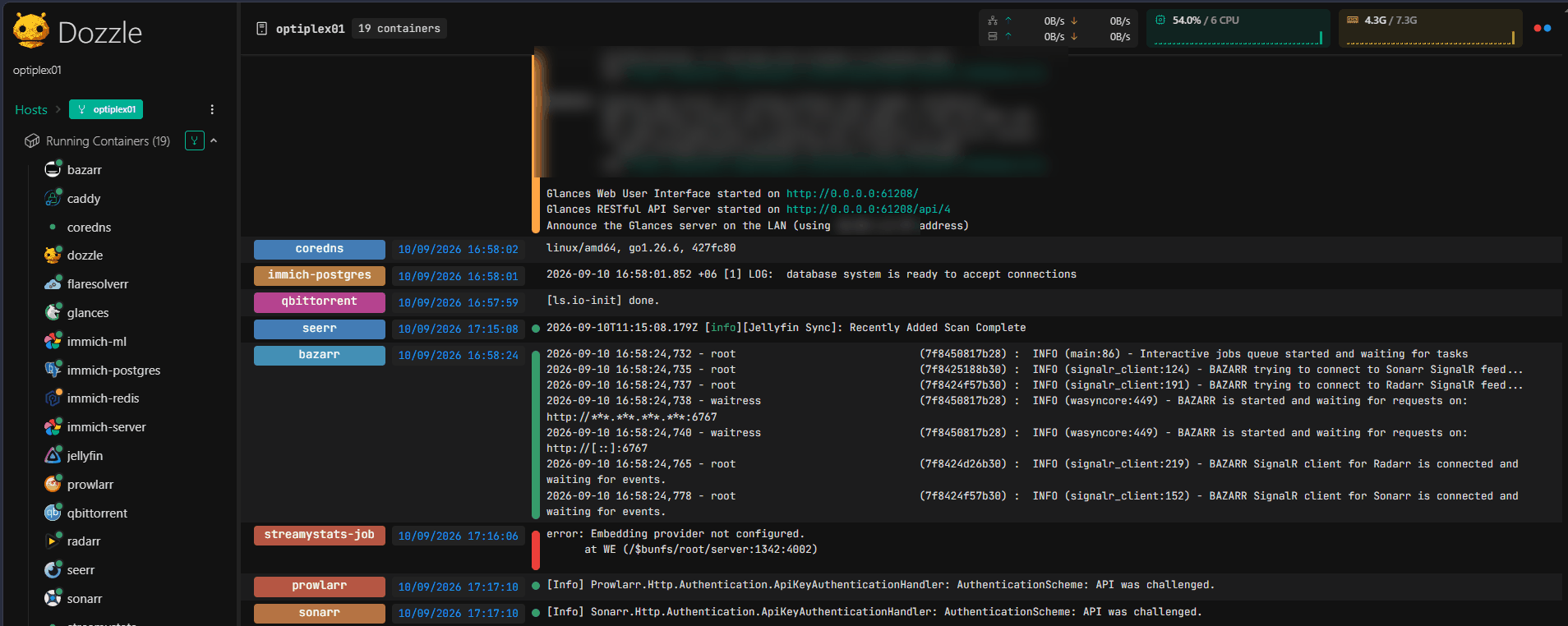
One thing worth recording: the log viewer's per-container CPU percentage is wrong under podman, inflated by roughly 305×. It is noted in the runbook, because a monitoring tool that lies confidently is worse than one that says nothing — the first time you see 3000% CPU you go looking for a problem that does not exist.
A Postmortem: Three Symptoms, One Root Cause
The best thing in this project is an incident write-up, because the wrong theories are the valuable part. A large download sat with zero peers indefinitely. It was not the ISP, not CGNAT, and not the source — but it took discarding two plausible explanations to establish that.
The affected service ran behind rootless podman's userspace port proxy on a bridge network. It sends its UDP tracker announcements and peer-discovery traffic from its own listen socket, and replies could not find their way back through that proxy — so every UDP announcement timed out. Meanwhile outbound UDP from an ephemeral port was translated normally, which is exactly why the obvious diagnostic succeeded and sent me the wrong way.
It fitted the evidence well — DNS over UDP worked, and every other UDP port timed out. Killed by sending a raw protocol probe to the same trackers, which got replies from both hosts. UDP egress had never been blocked.
The natural next guess. Killed by running the identical probe from inside the container itself, which also got a reply. Container UDP egress worked fine; only that application's own announcements failed. That distinction is the entire diagnosis — the difference between a probe's ephemeral source port and the application's own listen socket.
A third symptom had a different cause again: local peer discovery relies on multicast, and LAN multicast does not cross the podman bridge into a container's namespace. A machine on the same switch was broadcasting the whole time and nothing in the container could hear it. And the tracker could not introduce the two either, because both sit behind the same CGNAT address and clients skip peers advertising their own external address. Three discovery paths, three different reasons, two machines one metre apart.
The fix was to move that service to host networking so it owns its sockets directly instead of going through the proxy. Measured before and after: UDP trackers went from 0 working to 4–5 per torrent, and the distributed hash table from 0 nodes to 122 connected. Transfer over the LAN went from about 5 MB/s to 58 MB/s once the local peer was reachable.
The fix then broke three things, which is the part worth writing down. Leaving the container
network meant every service that referred to it by container name stopped resolving
— three automation services and the reverse proxy all had to be repointed. And the host's own
LAN address turned out to be unreachable from inside containers: the firewall drops traffic
arriving from the container bridge at that address, so the correct target is the special
host.containers.internal name podman provides for exactly this. Finally, the
reverse proxy's reload silently did not apply — it logged
success and exited zero while continuing to serve the old configuration, confirmed by reading
its live config back from the admin API. Only a restart applied it.
Known Constraints
Memory is the binding constraint — 7.3 GB against the photo stack's own 8 GB recommendation, with 19 containers sharing it. A 16 GB upgrade is planned, and the 8th-generation memory controller rejects single-rank ×16 modules, so the part has to be dual-rank ×8. That is the kind of detail you only learn by ordering the wrong one.
CGNAT means no inbound connections, which is good for exposure and bad for anything peer-to-peer. SMR makes sustained random writes the worst-case workload for the bulk disk, so the affected service runs with preallocation on and concurrency capped to compensate. Neither is solvable at this budget; both are documented so the next surprise is a shorter investigation.
What This Demonstrates
Writing software and operating it are different skills, and the second one is harder to evidence. This is where I have had to actually do the unglamorous half: decide what a green light means, find out whether a backup restores, discover that a monitoring tool is lying, work out why a fix broke three unrelated things, and write it all down for the version of me who hits it again in six months. The infrastructure decisions on my other projects — graceful eviction, digest pinning, health checks, provenance on every result — mostly come from having been burned here first, where the only person paged was me.